 |
 Entry About Shout Friends Follow D'Board |
|
|
Entry About Shout Friends Follow D'Board |
Giveaways
owner
  : Mariah Malfoy : Mariah Malfoy : Mariah Malfoy : Mariah Malfoy : Mariah Malfoy's xoxo : Mariah Malfoy's xoxo : Mariah Malfoy : Mariah Malfoycredits
|
  19:58 | 0 Comments(s) 19:58 | 0 Comments(s) [TUTORIAL] [2nd Method] How to change your Twitter background [TUTORIAL] [2nd Method] How to change your Twitter backgroundHi :)
This is the second method how to change your Twitter background .
This method can be use if you have a problem like this picture below .

--- SECOND METHOD ---
1) Click on the 'Settings' icon and then go to 'Settings' .

2) It will lead you here . Click on 'Design' .

3) Click 'Check out Themeleon' .

4) It will lead you here .

First, log in using your Twitter account and authorize the application .
 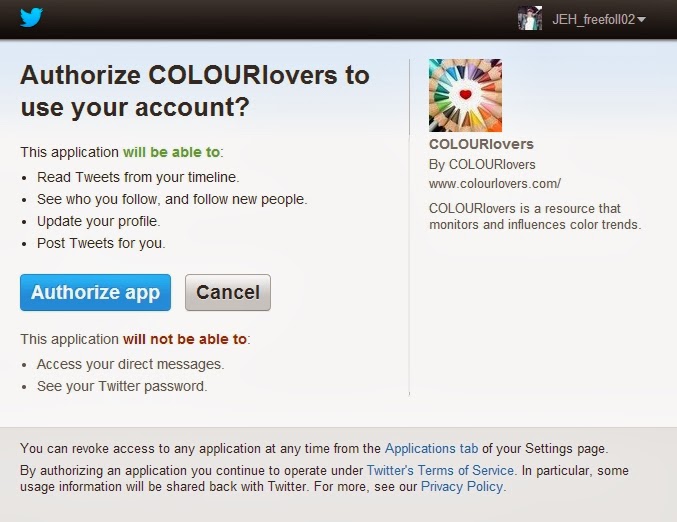
5) After you authorize the application, it will lead you back to Themeleon . As you see, there are 3 boxes .

----- 1. Theme : You can choose this premade theme .

----- 2. Background : You can choose the premade pattern by clicking the 'patterns' or customize your own by click the 'images' .
 
----- 3. Layout : This is almost the same like this . You can change the colors according to your style .
 
6) Finally, click 'Save Profile' at the middle of the page to save your background .

The result ... :D

I hope it's helping :D
This is the first method , click -> [TUTORIAL] [1st Method] How to change your Twitter background
Follow me on Twitter : ℳαяιαн ℳαʟғoγ (JEH_JYM) on Twitter
Follow me on Tumblr : Mariah Malfoy's xoxo
Follow me on Ask.fm : Mariah Malfoy | ask.fm/MariahHwa
Follow me on SoundCloud : ℳαяιαн ℳαʟғoγ’s stream on SoundCloud - Hear the world’s sounds
Follow me on Youtube : Mariah Malfoy - YouTube
*** If you have any questions, ask me on Twitter or Ask.fm / leave a comment :D ***
Labels: Twitter 19:57 | 0 Comments(s)[TUTORIAL] [1st Method] How to change your Twitter background
Hi :)
Today, I will teach you guys how to change your Twitter background .
There are 2 methods to change your background .
--- FIRST METHOD ---
1) Click on the 'Settings' icon and then go to 'Settings' .

2) It will lead you here . Click on 'Design' .

3) There are 2 options to change the background . You can choose the premade theme or customize your own .
 
4) If you want to use the premade theme, click on the theme that you would like to make as your background . Then, click 'Save change' at the bottom of the page .

5) If you want to customize your own background, click 'Change background' and then click 'Choose existing image' .
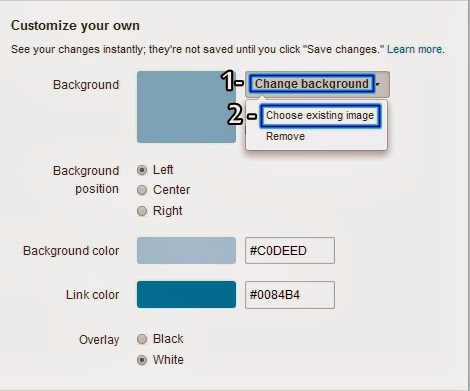
6) After you done choosing the picture,this is just an optional .
1. Click the 'Tile background' if you want to make the picture tiles .
2. You can change the picture position . (Left-Center-Right)
3. You can change the background color .
4. You can change the link color .
5. You can change the overlay . (Black-White)

7) Finally, click 'Save change' at the bottom of the page to save your background .
The result ... :D

I hope it's helping :D
If this method doesn't work, click -> [TUTORIAL] [2nd Method] How to change your Twitter background
Follow me on Twitter : ℳαяιαн ℳαʟғoγ (JEH_JYM) on Twitter
Follow me on Tumblr : Mariah Malfoy's xoxo
Follow me on Ask.fm : Mariah Malfoy | ask.fm/MariahHwa
Follow me on SoundCloud : ℳαяιαн ℳαʟғoγ’s stream on SoundCloud - Hear the world’s sounds
Follow me on Youtube : Mariah Malfoy - YouTube
*** If you have any questions, ask me on Twitter or Ask.fm / leave a comment :D ***
Labels: Twitter 
|
 Skins By :